Lucky7even Mobile Casino Australia: PWA Setup on iPhone and Android
 Available in US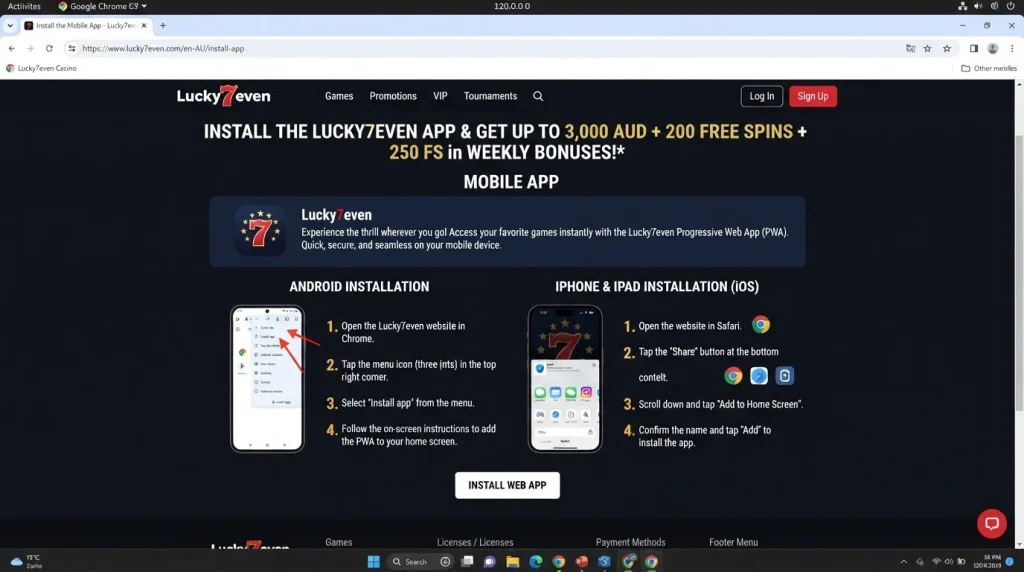
Lucky7even’s current mobile install path for Australian users is an installable web app/PWA for Android and iPhone. The official English-AU install page gives browser-based installation steps: Android users open the browser menu and choose “Install App”, while iPhone users use Share and then “Add to the Home Screen”. This guide does not describe Lucky7even as a native App Store or Google Play app because the official install page documents a web-app flow instead.
You do not have to install the home-screen version to use the service. The official English-AU site remains accessible through a mobile browser, so the practical choice is between ordinary browser access and a home-screen web app that opens the same current web service.
Table of Contents
- What the Lucky7even “app” actually is
- How to install Lucky7even on Android
- How to install Lucky7even on iPhone
- Browser versus PWA: what changes in practice
- Check the domain before adding anything to your home screen
- Using pokies and live casino on mobile
- Mobile cashier and account continuity
- Support from a phone
- When browser access is the better option
- Mobile safety checklist for Australian users
- Lucky7even mobile FAQ
- Official sources
- Lucky7even Games Australia: Pokies, Tables and Providers
What the Lucky7even “app” actually is
The word “app” is ambiguous in casino searches. It can mean a native program downloaded from Apple’s App Store or Google Play, an Android APK installed from a file, or a progressive web app added from a browser. Lucky7even’s current official evidence supports the third model: an installable web app/PWA.
A PWA uses the website as its service layer but can be launched from a home-screen icon after installation. That makes it feel closer to an app launcher without implying that a separate native store package exists. The official install page itself uses the heading “How to install web app” for both Android and iPhone.
How to install Lucky7even on Android
The current English-AU install page gives a three-step Android sequence:
- Open the Lucky7even home page. Use the verified official domain and load the site in your mobile browser.
- Open the browser menu. The official instruction tells users to tap the three-dot menu and choose “Install App”.
- Confirm installation. Select the install confirmation. The web app can then be launched from the device like a home-screen application.
The exact wording or position of a browser menu can change with browser updates, but the operator’s current documented flow is browser installation rather than downloading an APK file. If the install option is not visible, continue through the browser instead of searching for an unofficial installer.
That fallback is important because the PWA is a convenience layer, not a requirement for holding an account. If you can reach the verified English-AU site securely, you can still log in and use the web interface without creating a home-screen shortcut.
How to install Lucky7even on iPhone
The official iPhone flow also has three steps:
- Open the Lucky7even home page. Start from the official site in the iPhone browser.
- Tap Share. Lucky7even’s current instruction points to the Share control in the browser navigation.
- Choose “Add to the Home Screen” and confirm Add. This creates the home-screen web-app entry.
This is not evidence of a separate native iOS binary. The verified installation path is the browser’s home-screen mechanism. That distinction matters because users searching the App Store for a similarly named product can encounter unrelated or lookalike listings.
If the home-screen option is missing or you prefer not to install it, browser access remains the straightforward alternative. The account is tied to the Lucky7even service, not to whether a shortcut has been added to the device.
Browser versus PWA: what changes in practice
| Access method | What it does | What is not established |
|---|---|---|
| Mobile browser | Opens the English-AU Lucky7even website directly in the browser. | No claim that a particular browser delivers a fixed performance level. |
| Installed web app/PWA | Adds a launchable web-app entry using the official browser install flow. | No claim of offline casino play, native-store ownership or special device permissions. |
| Native App Store / Google Play app | Would require a verified store listing and native package. | No native store listing is confirmed by the current official sources. |
| Third-party APK or mirror | Installs software obtained outside the verified Lucky7even web flow. | Not recommended or treated as an official install path. |
The PWA distinction is more than terminology. It tells you where updates come from and what needs to be verified. With a web app, the most important security check is that the shortcut was created from the genuine Lucky7even site rather than from a copied domain or an installer offered elsewhere.
Check the domain before adding anything to your home screen
The current Australian-localised route is www.lucky7even.com/en-AU. Before adding the web app, inspect the browser address and confirm you are on the Lucky7even domain. Do not rely only on a familiar logo, colour scheme or search-ad title because those visual elements can be imitated.
A sensible mobile workflow is to open the official site from a trusted bookmark, sign in only after confirming the domain, and then create the home-screen entry from that page. Once installed, avoid creating duplicate shortcuts from different domains because it becomes harder to tell which one points to the verified service.
If you have a login or registration problem after confirming the domain, move to the dedicated account and login guide rather than reinstalling from an unverified source.
Using pokies and live casino on mobile
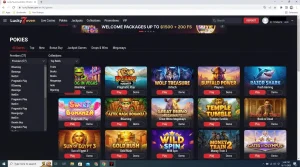
Lucky7even’s current AU site has a broad casino lobby and a separate live-casino area. On mobile, the important question is not whether every title exists on every device, but whether the game you want is available to your account and works comfortably on the current connection.
Provider restrictions still apply. Lucky7even’s current terms identify Australia in restrictions affecting NetEnt and Amatic, so a title visible in a global provider list is not automatically an Australian mobile option. The dedicated games and pokies guide explains the current AU categories and provider restrictions in more detail.
For live tables, streaming adds another dependency: network stability. The site currently exposes live blackjack, roulette, baccarat, game shows and poker categories, but no official latency or frame-rate benchmark is published. If the stream or controls are unreliable on your connection, change network or device before staking money rather than assuming the PWA itself guarantees better performance.
Mobile cashier and account continuity
The mobile web service is part of the same Lucky7even account environment. The practical tasks users care about – logging in, navigating the casino, opening the cashier and reaching support – are all web-service tasks rather than proof of a separate native app backend.
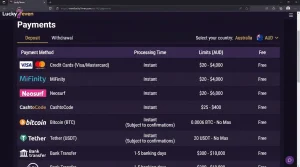
Lucky7even’s AU payments page currently publishes cards, e-wallets, alternatives and crypto options. Method availability can still be account-specific, so the mobile cashier should be checked directly before preparing a deposit or withdrawal. For the current method surface and PayID status, see the mobile cashier and payment methods guide.
Do not interpret a successful mobile deposit as proof that every withdrawal will follow the same route or speed. Cashout limits, KYC dependencies and payment-rail timing are separate topics. The mobile page stays focused on access and installation rather than duplicating the payment and withdrawal guides.
Support from a phone
Lucky7even’s official AU support page currently states 24/7 live-chat support and also provides an email channel. On mobile, live chat is the most direct route for a problem that cannot be resolved by refreshing the browser, confirming the domain or signing in again.
When contacting support about a mobile problem, describe whether you are using ordinary browser mode or the installed web app, the device type and the exact point where the issue occurs. That is more useful than simply saying “the app is broken” because the support agent needs to know whether the problem is installation, login, cashier access or a specific game.
Never send passwords or authentication codes in a support conversation. If support asks for identity documents as part of account verification, use the official process linked from the verified site and check that the request belongs to your account.
When browser access is the better option
Installing the PWA is optional. Browser access can be preferable on a shared device, on a device where you do not want a gambling shortcut visible, or when you are troubleshooting whether a problem comes from the installed web app or the underlying site.
It is also a useful recovery path. If the home-screen shortcut stops opening correctly after a browser or operating-system update, open the verified Lucky7even URL directly. If the site works in-browser, you have isolated the issue to the shortcut or installation layer rather than the account itself.
Conversely, if both browser and PWA access fail, reinstalling repeatedly is unlikely to solve an account-level restriction or authentication issue. Verify the domain, test the official site, then use support or the account guide.
Mobile safety checklist for Australian users
- Start from www.lucky7even.com and confirm the English-AU locale before signing in.
- Use the official browser installation flow for Android or iPhone.
- Do not install an APK from a mirror or download site.
- Do not treat a similarly named App Store or Google Play listing as official without direct verification from Lucky7even.
- Keep the browser and operating system updated.
- Use a screen lock on a phone that stores account access.
- Do not save passwords on a shared device.
- Check the live cashier for current methods instead of relying on an old saved page.
- Check the individual game or live table for current availability rather than assuming desktop and mobile catalogues are identical.
These checks are simple, but they address the main risk created by the word “app”: users can be pushed toward unofficial downloads when the verified product is actually a web app installed from the browser.
Lucky7even mobile FAQ
Does Lucky7even have an app for iPhone?
Lucky7even’s official install page provides an iPhone web-app installation flow using Share and “Add to the Home Screen”. No separate native App Store listing is confirmed by the current official sources.
Does Lucky7even have an Android app?
The official page provides an Android web-app installation flow through the browser menu and “Install App”. Avoid third-party APK files; the official route is the browser-based web-app installation flow.
Can I use Lucky7even without installing the web app?
Yes. The verified English-AU service is a website, so ordinary mobile-browser access remains the fallback when you do not want a home-screen installation.
Are all games available on Australian mobile accounts?
No universal catalogue promise is appropriate. Current Lucky7even terms include Australia-specific provider restrictions, and individual game availability can differ by provider and account context.
Where should I troubleshoot login problems?
First confirm the official domain and test ordinary browser access. For registration, login and account-specific troubleshooting, use the dedicated account guide.
Official sources
The install flow shown here reflects the Lucky7even English-AU install page as of 9 September 2026. The official English-AU site, current terms and support page provide the related domain, provider-restriction and support context.
For the broader verdict across bonuses, games, payments, withdrawals and Australian regulatory context, return to the full Lucky7even Australia review.